Email it. Send it.
Forward a client thread — Kelvo replies with a polished invoice.
Snap it. Track it.
Email a receipt photo and Kelvo logs the expense for you.
Know the second.
Live email alerts the moment a client pays — no app to open.
Invoice today.
Paid tomorrow.
Kelvo turns one email into a sent invoice, a logged expense, or a paid receipt — in any currency, any language. Built for freelancers who'd rather work than chase money.
- No credit card required
- 10 invoices free, forever
- Inventory & expenses included
— Email magic · I.
Forward an email. Get an invoice.
Your inbox is the interface. Kelvo reads what your client sent, fills in the fields, and sends back a polished invoice — in under a minute, no app required.
Forward the client email
Sarah Chen
sarah@northwood.co · 9:42 AM
Invoice for the hero illustrations?
Hey — can you bill me €1,200 for the hero illustrations? Net 14 would be great. Thanks!
Kelvo parses it
Five fields filled in, no typing.
Invoice sent
Kelvo invoice
INV-024 · €1,200.00
Sarah Chen · Net 14
Sent to sarah@northwood.co
PDF attached. Read receipt on. You'll know the moment Sarah opens it.
— In action · II.
Every screen does its job and gets out of the way.
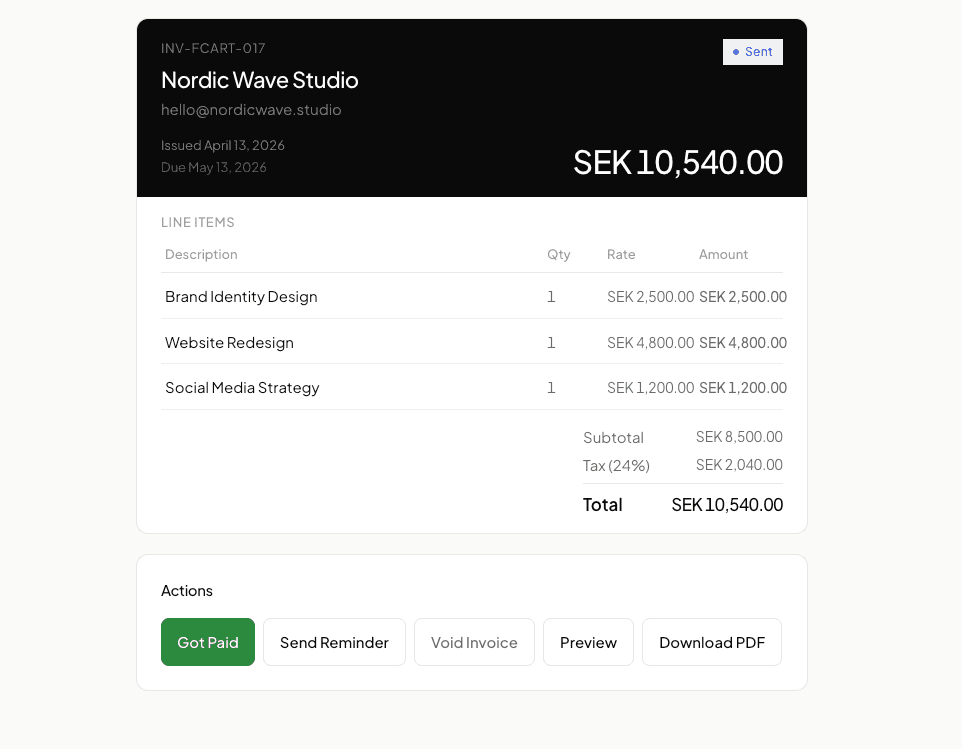
Invoices that look as professional as your work.
Auto-numbered. PDF-ready. Sent directly from Kelvo. Read receipts let you know the moment a client opens one — no more wondering.
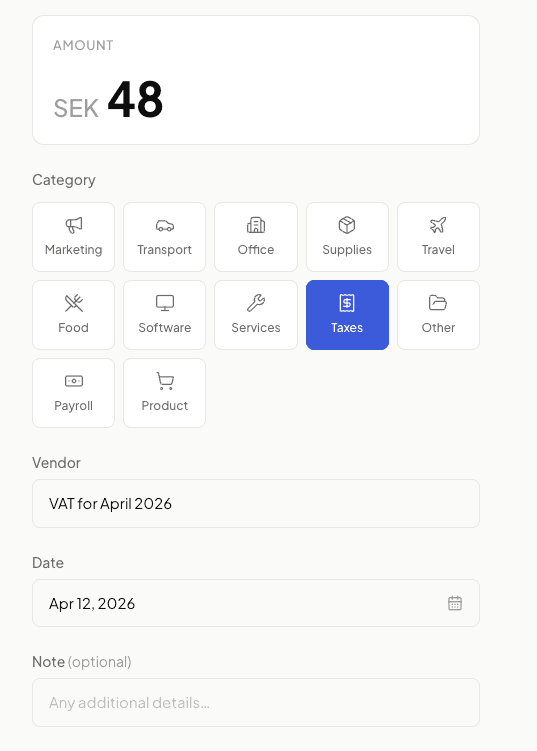
Expenses logged with one tap.
Snap a receipt, pick a category, done. Every expense flows straight into your books — at year end, your accountant gets a clean export.
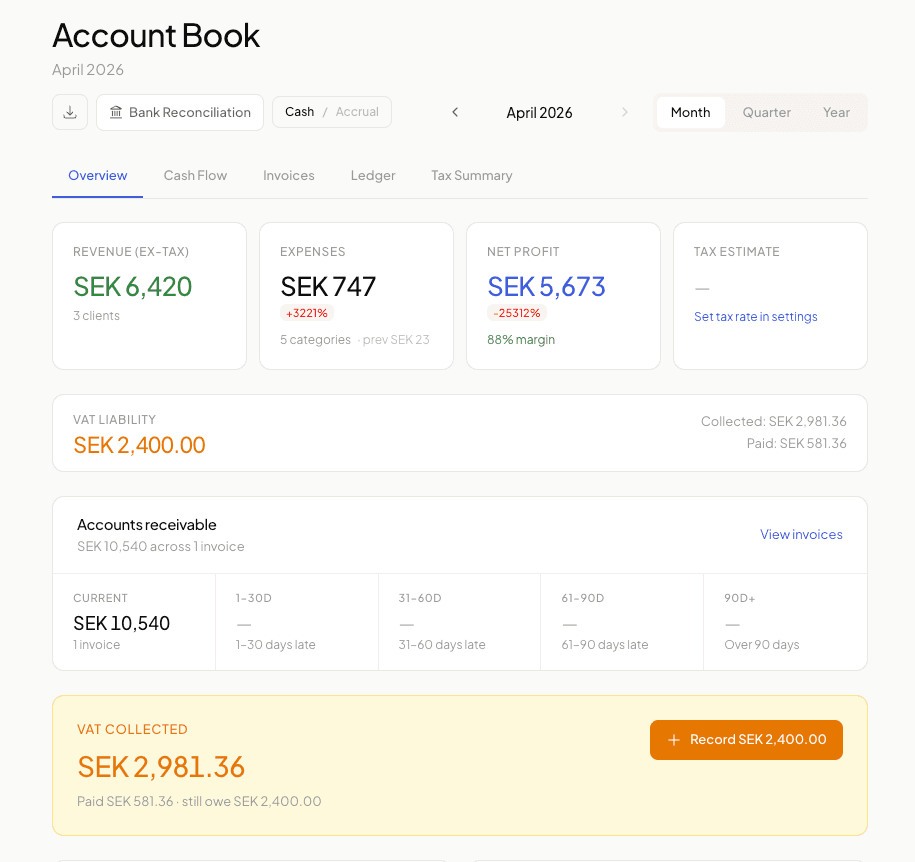
Real accounting, none of the complexity.
Cash or accrual, AR aging buckets, upcoming cash flow, an instant tax estimate. Your P&L writes itself, in the background, while you work.
— Built for · III.
Wherever you work, in whatever you charge.
Kelvo is the same fast tool whether you bill in euros from Berlin, dollars from Lagos, or rupees from Bangalore. Six languages. Eight currencies. Zero friction.
For freelancers like
Designers
Bill retainers in three currencies. Set per-project rates that stick.
Developers
Itemize hours and milestones, automatic VAT split for EU clients.
Writers
Track per-word rates and recurring monthly retainers without spreadsheets.
Photographers
Log expenses with receipts attached, shoot by shoot, edit by edit.
Studios
Payroll for the team and contractor invoicing — one app, one source of truth.
Consultants
Net-15 reminders that send themselves. You stop being the awkward one.
Bill in
08Read in
05— Pricing · IV.
Simple pricing. No surprises.
Free
A.No credit card. No expiry. No catch.
- 10 invoices per month
- Unlimited expenses
- Unlimited clients
- Inventory (25 items)
- 1 recurring invoice
- Books & P&L statement
- PDF & CSV export
Pro
Most popularBilled monthly. Cancel anytime. One client payment covers your whole year.
Less than one billable hour. Earns itself back the first invoice you don't forget to send.
- Unlimited invoices & expenses
- Unlimited inventory items
- Payroll & pay stubs
- Auto payment reminders
- Recurring invoices
- Magic email inbox
- Everything in Free, unlocked
— FAQ · V.
Common questions
Yes, really. Every Kelvo account comes with a personal @kelvo.app email address. You can forward receipts to it, or reply to any email with something like "paid $800 from Acme" — and Kelvo logs it automatically. You can also use the full app if you prefer — but you never have to open it to stay on top of your finances.
Kelvo supports all major global currencies including USD, EUR, GBP, CAD, AUD, NGN, KES, GHS, ZAR, INR, and many more. You can set a default currency for your business and override it per-client or per-invoice. Perfect if you work with clients across different countries.
Yes, absolutely. No contracts, no lock-in. Cancel your Pro subscription any time from your account settings and you'll keep access until the end of your billing period. Your data and invoices are never deleted — you can always export everything.
Kelvo tracks payments rather than processing them. When a client pays via bank transfer, PayPal, Wise, or any method you prefer, you mark the invoice as paid in Kelvo — or just email your @kelvo.app address and it logs automatically. We stay out of the money flow.
Your data is stored securely with Supabase (built on PostgreSQL) with row-level security enabled. Every user can only access their own data. All connections are encrypted with TLS.
The free plan includes 10 invoices per month (forever), unlimited expenses, unlimited clients, inventory tracking (up to 25 items), 1 recurring invoice, and full books & P&L — no credit card required. Upgrade to Pro for €7/mo to unlock everything.
— VI. Start
Send your first invoice today.
Email invoices. Track payments. Know your numbers. All from your inbox — or the app, whenever you want.